Short answer: yes. WordPress gives you clean URLs, editable titles, an XML sitemap and a sound HTML structure without any setup. It won’t pick keywords, write your meta descriptions or make a slow theme fast. That part is still yours, and this guide covers it.
Key takeaways
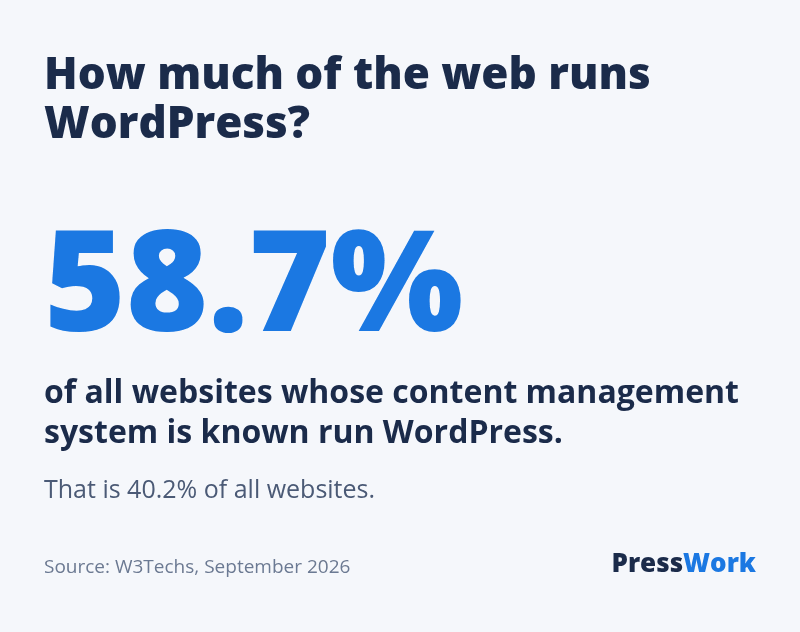
- WordPress runs 58.7% of all websites whose CMS is known (W3Techs, September 2026).
- Out of the box it gives you readable URLs, title tags, an XML sitemap and canonical tags.
- You still need one SEO plugin, a fast theme, meta descriptions and pages that answer the search.
WordPress runs 58.7% of all websites whose CMS is known, and 40.2% of all websites (W3Techs, September 2026). So the question isn’t whether WordPress sites can rank. Most of the web that ranks is WordPress. The question is what WordPress does for you and what it leaves on your desk.
What WordPress does for your SEO out of the box
A fresh install with a decent theme already handles the technical basics most site builders charge for:
- Readable URLs. Under Settings → Permalinks, pick “Post name” and every page gets an address like
/wordpress-seo-checklist/instead of/?p=123. - A title tag per page. WordPress builds the
<title>from your post title and site name. Themes declare support for it since WordPress 4.1. - An XML sitemap. Since WordPress 5.5, every site has one at
/wp-sitemap.xml. SEO plugins replace it with a more complete one. - Canonical tags. Each post and page points to its own preferred URL, which stops duplicate versions from competing with each other.
- Old-URL redirects for posts. Change a post’s slug and WordPress sends the old address to the new one.
- Image basics. An alt text field on every image, responsive image sizes, and native lazy loading since WordPress 5.5.
- Structure. Categories, tags, headings and menus give search engines a clear map of what the site covers.
What WordPress doesn’t do
This is where most WordPress sites lose. Core leaves several jobs to you or to a plugin:
- No meta description field. Without one, Google writes its own snippet from your page text.
- No control over what gets indexed. Tag pages, author archives and date archives all go into search by default, and most of them are thin.
- No structured data worth the name. Article, FAQ, product and organization markup come from your theme or a plugin.
- No redirect manager. Delete a page or change a page slug and old links hit a 404.
- No speed guarantee. Speed depends on your theme, your plugins and your host. WordPress itself is rarely the slow part.
- No content. The biggest ranking factor is still a page that answers the search better than the others. No CMS writes that for you.
How to do SEO on WordPress: a 10-step checklist
Do these once, in this order. Steps 1 to 4 take about 30 minutes on a new site.
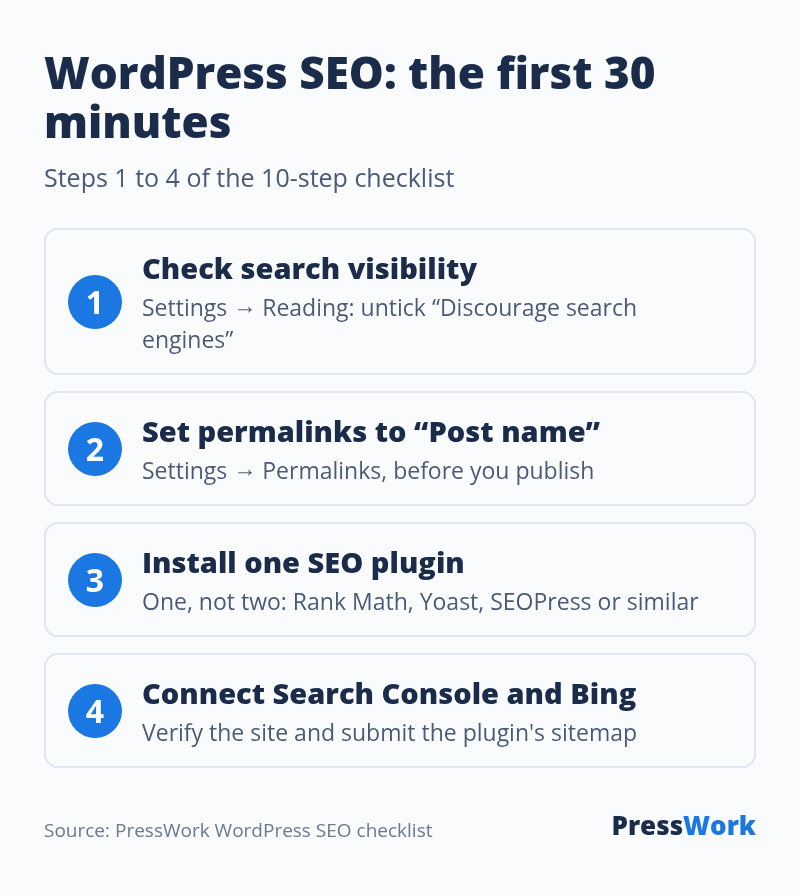
- Check search visibility. Settings → Reading → make sure “Discourage search engines from indexing this site” is unticked. Sites launched from a staging copy often keep it ticked for months.
- Set permalinks to “Post name”. Do it before you publish. Changing the structure on an established site breaks every old URL unless you redirect them.
- Install one SEO plugin. One, not two. Two plugins print two sets of titles, canonicals and schema. See the comparison below.
- Connect Google Search Console and Bing Webmaster Tools. Verify the site, then submit the sitemap your SEO plugin creates (usually
/sitemap_index.xmlor/sitemap.xml). - Write a title and meta description for every page that matters. Put the main search term near the start of the title. Keep descriptions short enough to show in full on a phone.
- Use categories for structure, tags sparingly. A handful of broad categories beats fifty tags with one post each. Set tag archives to noindex unless each tag gathers real content. See what 399 top sites do with their tags.
- Fix images before upload. Resize to the width you display, compress, give the file a descriptive name and write alt text that says what the image shows.
- Get the speed right. A lightweight theme (we measured the fastest WordPress themes), a caching plugin (or your host’s built-in cache) and fewer plugins. Test with PageSpeed Insights on mobile.
- Link your own pages together. Every new post should link to two or three related ones, and get linked from them. Internal links are the one ranking signal you fully control.
- Add structured data. Let your SEO plugin output Article and Organization markup, then check a page with Google’s Rich Results Test.
Google’s own SEO Starter Guide covers the reasoning behind most of these steps. It is short and worth one read.
The best WordPress SEO plugins
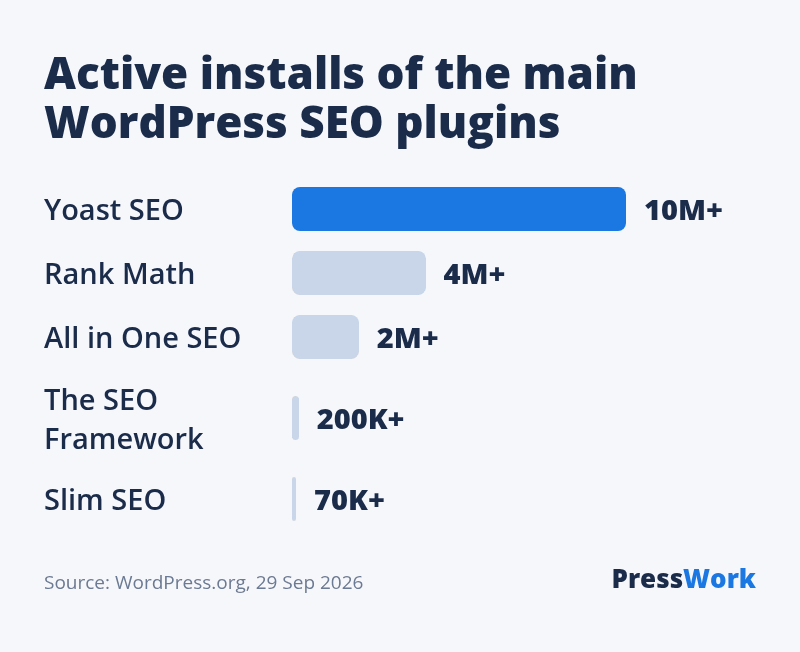
All five below are free on WordPress.org and cover titles, meta descriptions, sitemaps, canonicals and basic schema. The differences are in how much they add on top, and how much they nag.
| Plugin | Active installs | Best for |
|---|---|---|
| Yoast SEO | 10+ million | Beginners who want guidance on every post |
| Rank Math | 4+ million | Most features in the free version: schema types, redirects, 404 log |
| All in One SEO | 2+ million | Setup wizard and local SEO add-ons |
| The SEO Framework | 200,000+ | Fast, no ads in the dashboard, sensible defaults |
| Slim SEO | 70,000+ | Near-zero settings: it fills in the basics and gets out of the way |
Which one? Rank Math if you want redirects and schema without paying. Yoast if you want the most tutorials to follow. The SEO Framework or Slim SEO if you know what you’re doing and want a quiet dashboard. This site runs Rank Math with most modules switched off: sitemap, schema and instant indexing only.
Switching later is fine. Yoast, Rank Math and All in One SEO can each import the other plugins’ titles and descriptions. For prices, speed tests and what the biggest sites use, see our full comparison of the best SEO plugins for WordPress.
SEO-friendly WordPress themes and frameworks
“SEO-friendly” on a theme sales page usually means nothing. A theme helps SEO in four concrete ways: it loads fast, it prints one clean H1 per page, it works on mobile, and it doesn’t lock your content inside its own shortcodes. That’s the whole list.
These free themes pass all four and are popular enough to be well maintained:
| Theme | Active installs | Notes |
|---|---|---|
| GeneratePress | 500,000+ | Very light, classic or block editor. This site runs it. |
| Astra | 1+ million | Light, huge library of starter sites |
| Kadence | 500,000+ | Strong header and layout controls without a page builder |
| Blocksy | 300,000+ | Modern design, built around the block editor |
| Twenty Twenty-Five | 1+ million | The default theme: minimal and fully block-based |
Frameworks were the 2010s answer to the same problem: a solid parent theme that handles code quality, with a child theme on top for the design. Genesis was the best known. PressWork, the project this site started as, was one too. Today the lightweight themes above do the framework job on their own, with a child theme when you need custom code.
Want to know what theme a site that outranks you is using? Paste its address into our WordPress theme detector. It shows the theme, the parent theme if there is one, and the plugins that load on the page. The plugin detector shows which SEO plugin a competitor runs. For more on picking a theme, see 6 tips on how to choose a WordPress theme.
5 WordPress SEO mistakes we see often
- Two SEO plugins at once. Duplicate title tags and schema. Pick one and deactivate the other.
- Indexed tag and archive pages. Hundreds of near-empty pages dilute the good ones.
- Page-builder leftovers. Switch themes or builders and old shortcodes like
[vc_row]show up as raw text on the page. This very article had them until its 2026 rewrite. - Changing URLs without redirects. Every link pointing to the old address is lost. Add a 301 with your SEO plugin or the free Redirection plugin.
- Too many plugins loading on every page. Each one can add scripts and styles. Remove what you don’t use, and check what loads with the plugin detector.
WordPress vs Wix and Squarespace for SEO
All three can rank. Wix and Squarespace now cover the basics: editable titles, sitemaps, redirects, clean URLs. The difference is control. With WordPress you choose the host, edit any line of code, and pick from thousands of plugins. With a hosted builder you get fewer ways to break things, and fewer ways to fix them.
For a content site that will grow past a few dozen pages, WordPress is the safer bet. For a five-page brochure site, the platform matters far less than what you write on it. Not sure what a competitor is built on? The CMS detector tells you.
What to do next
- Open Settings → Reading and make sure search engines are allowed.
- Set permalinks to “Post name” if the site is new.
- Install one SEO plugin. Not sure which? See the best SEO plugins compared.
- Submit your sitemap in Google Search Console and Bing Webmaster Tools.
- Write a title and description for your 10 most important pages.
What theme and SEO plugin do the sites above you use?
Paste a competitor’s address into our free theme detector. It shows the theme, the parent theme and the plugins that load on the page.
FAQ
Is WordPress SEO friendly without a plugin?
Mostly. You get clean URLs, title tags, canonicals and a sitemap. You don’t get meta descriptions, indexing control for archives, or rich schema. A free SEO plugin fills those gaps in ten minutes.
Is Yoast or Rank Math better?
Both do the essentials well. Rank Math gives more in the free version, including redirects and more schema types. Yoast has the larger install base and more third-party tutorials. Either is a fine choice. Running both is not.
Does my WordPress theme affect SEO?
Yes, through speed, heading structure and mobile layout. A heavy theme with a bundled page builder can slow every page. A light theme like GeneratePress, Astra or Kadence removes that problem.
Should I use tags in WordPress for SEO?
Only if each tag will collect several posts. Tags with one or two posts create thin archive pages. Use categories for structure and keep tag archives out of the index until they earn their place.
How long does WordPress SEO take to work?
Technical fixes show up as soon as Google recrawls the page, often within days. Rankings for new content usually take weeks to months, depending on competition and on how many sites link to yours.
Whatever CMS you use, there is no way to be better than a human professional in SEO field. Yes on page SEO is the foundation on which it builds but then they will need the knowledge of SEO expert.
Good article 🙂 and plugin like Yoastseo does also helps.
I have a similar experience