Short answer: WordPress MCP lets an AI agent such as Claude or ChatGPT work on your site through a standard connection, and your site may already have one. The official piece is a free plugin called MCP Adapter. We checked the top WordPress sites: 84 of 417 (one in five) already list its endpoint, mostly on sites that run Rank Math or Elementor, which both ship it.
Key takeaways
- 84 of 417 top WordPress sites (20%) already list the MCP Adapter endpoint. 65 of them run Rank Math, Elementor or both.
- On a clean WordPress 7.1.3, the official MCP Adapter gives an agent 3 abilities, all read-only. Plugins add the rest.
- This site has 56 abilities registered, 53 of them by plugins we already ran. 15 can change something. The endpoint refuses requests without a login.
We didn’t repeat what other blogs say. We read the code of the MCP Adapter, WordPress 7.1.3 and six popular plugins, ran the adapter on a clean test site, and scanned the top WordPress sites. For the record, this site runs Rank Math, which is why it has an MCP endpoint too. We have no affiliate deal with any plugin named here.
What WordPress MCP is
WordPress MCP is a way for an AI agent to see what your site can do and to do it, with your login and your permissions. MCP stands for Model Context Protocol, an open standard for connecting AI tools to other software. Three parts make it work on WordPress:
- Abilities. An ability is one action a site offers, such as “get site information”. WordPress and plugins register them through the Abilities API, which arrived in WordPress 6.9.
- The MCP Adapter. A plugin from the WordPress project that turns those abilities into MCP tools. Its own description: “MCP Adapter is the server and transport layer. It does not provide any AI features itself.”
- An MCP client. The AI tool on your side. WordPress’s developer blog names Claude Desktop, Claude Code, Cursor and VS Code.
One warning if you arrived from Google: the first result for “wordpress mcp” is the GitHub project Automattic/wordpress-mcp. It is archived. Its own description sends you to WordPress/mcp-adapter, which had 1,824 stars on 10 October 2026 and released version 0.7.0 on 2 October.
Three ways to get MCP on WordPress
You can install the official adapter, use WordPress.com’s hosted server, or pick a third-party plugin. They differ in where the server runs and in what it can do on day one.
| Route | Runs on | Cost |
|---|---|---|
| MCP Adapter plugin | Your site | Free |
| WordPress.com MCP | Their servers | Paid plan |
| Third-party plugin | Your site | Varies |
- MCP Adapter. On WordPress.org since 2 October 2026, version 0.7.0. It needs WordPress 6.9 and PHP 7.4. WordPress.org shows 40,000+ active installs eight days after it was listed.
- WordPress.com MCP. WordPress.com’s guide (last reviewed 7 October 2026) says it is “available on all WordPress.com paid plans”, and for the first 30 days on a free site. Self-hosted sites can use it when connected through Jetpack “with a Jetpack AI or Jetpack Complete plan”.
- Third-party plugins. 98 plugins on WordPress.org have “MCP” in their name. More on those below.
One in five top sites already lists an endpoint
84 of 417 top WordPress sites (20%) list the MCP Adapter’s endpoint in their public REST API index. We took the 716 WordPress sites in the top 10,000 domains (Tranco list) and read each site’s REST API index on 10 October 2026. 417 answered.
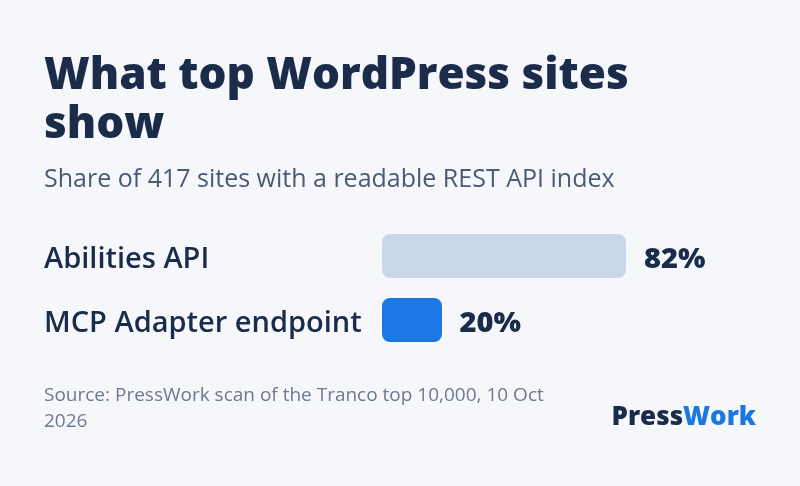
- 344 of 417 (82%) list the Abilities API, which ships with WordPress 6.9 and later.
- 84 of 417 (20%) list the adapter’s default endpoint,
/wp-json/mcp/mcp-adapter-default-server. - Examples, re-checked by hand on 10 October 2026: cnet.com, zdnet.com, woocommerce.com, pewresearch.org, nextcloud.com, mariadb.org, matomo.org and wpastra.com. wordpress.org runs its own MCP server at a different address.
What this does and doesn’t show. It shows the address exists on those sites. It doesn’t show that anyone uses it, and it is not a security hole in itself: on our test sites and on this site, the endpoint refuses any request without a login. We sent nothing to other sites’ endpoints. Sites that block their REST API index are not in the data, and we don’t name the adult sites in the list.
Why: plugins ship the adapter
Most of these sites run a plugin that ships the MCP Adapter inside its own code, so nobody had to install it. Of the 84 sites, 39 run Rank Math, 19 run Elementor, 7 run both and 19 run neither.
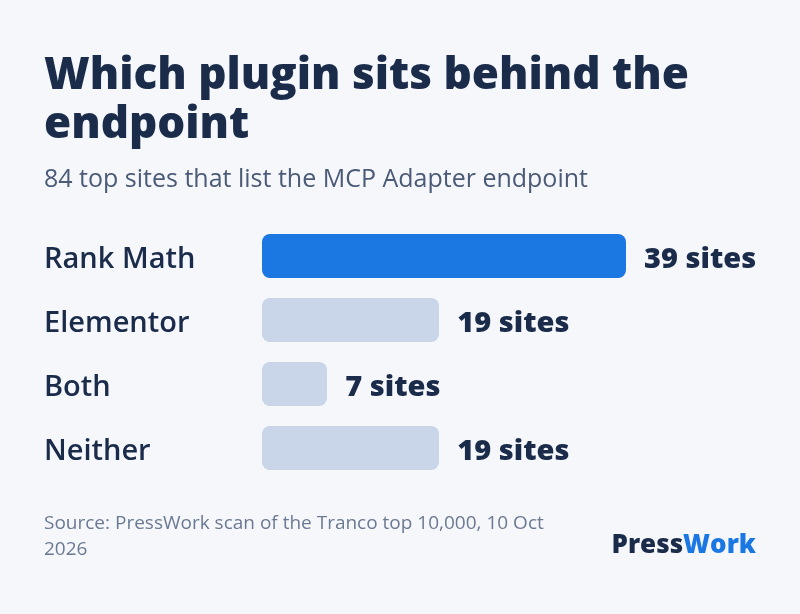
Seen from the other side: 46 of the 58 Rank Math sites in the scan (79%) list the endpoint, and 26 of the 55 Elementor sites (47%). We then opened the plugins’ code, in the versions on WordPress.org on 10 October 2026:
| Plugin | Adapter inside | On by default |
|---|---|---|
| Rank Math 1.0.280 | 0.5.0 | Yes |
| Elementor 4.3.4 | 0.6.1 | Yes |
| WooCommerce 11.2.1 | 0.3.0 | No |
| Yoast SEO 28.6 | None found | n/a |
| SEOPress 10.3 | None found | n/a |
| Jetpack 16.3 | None found | n/a |
- Rank Math loads the adapter whenever the Abilities API is present. It also adds a second address,
mcp-oauth-server, from an OAuth package it bundles. - WooCommerce keeps its MCP feature switched off by default and marks it experimental. It still registers 7 abilities, including creating, updating and deleting products.
- The 19 “neither” sites got the endpoint some other way. We could not tell how from the outside.
What an agent can do on a fresh install
Very little: on a clean WordPress 7.1.3 with the MCP Adapter, an administrator’s agent finds 3 abilities, and all 3 only read. We set up a new site in WordPress Playground, activated one set of plugins at a time with no further setup, and connected as an administrator.
| Active plugins | MCP | Abilities |
|---|---|---|
| None | No | n/a |
| MCP Adapter 0.7.0 | Yes | 3, read only |
| MCP Adapter + AI 1.4.0 | Yes | 3, read only |
| Rank Math 1.0.280 | Yes | 0 |
| Elementor 4.3.4 | Yes | 3, read only |
| WooCommerce 11.2.1 | No | n/a |
The 3 abilities come from WordPress itself: get site information, get the current user’s profile, and get environment details (PHP, database and WordPress versions). No ability in WordPress 7.1.3 creates or edits a post. A plugin has to add that.
The adapter always shows the agent the same 3 tools: discover abilities, get ability info, and execute ability. The agent uses them to find and run whatever your plugins have registered. Without a login, every request got an HTTP 401 refusal.
What we found on our own site
This site has 56 abilities registered and an MCP endpoint, and we set up neither. The site runs WordPress 7.1.3 and Rank Math 1.0.279. Here is who registered what:
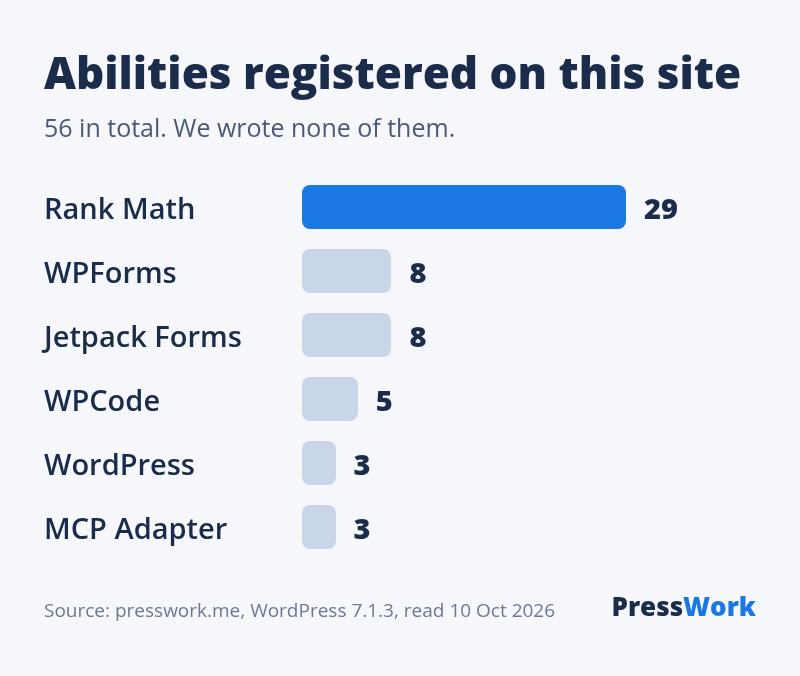
- 40 of the 56 are flagged by their plugin for MCP: 29 from Rank Math, 8 from Jetpack Forms and 3 from WPForms.
- 15 of those 40 can change something. Rank Math has 11 (for example its sitemap, homepage SEO and module settings). Jetpack Forms has 4 (create or delete a form, update responses).
- The endpoint answers 401 to a request without a login. We checked on 10 October 2026.
Compare with the clean test above, where a just-activated Rank Math listed no abilities. A site that is set up and running registers far more than a new one.
Is WordPress MCP safe?
The design is careful: nothing works without a WordPress login, and an ability must be marked public before the default server offers it. Here is what the code of MCP Adapter 0.7.0 and WordPress 7.1.3 does.
- Login required. The endpoint checks that the user is logged in and has the “read” capability, which every default WordPress role has, down to Subscriber.
- Each ability checks again. WordPress’s “get site information” asks for the
manage_optionscapability, which only administrators have by default. - Opt-in. The adapter’s FAQ: “exposure is opt-in. An ability is only reachable over MCP if it has been marked public”.
- The agent acts as you. Connect as an administrator and the agent can run every ability an administrator can.
Our advice, not a measurement: the risk is less the endpoint than the account you connect with. Give the agent its own user with the lowest role that does the job, and look at which abilities your plugins registered before you connect anything.
How to connect an AI agent
On a self-hosted site you need the adapter, a user for the agent, and the endpoint address. This is the path we used on the test site.
- Check the version. The MCP Adapter needs WordPress 6.9 or later and PHP 7.4 or later.
- Install the adapter. Plugins, Add New, search “MCP Adapter”. Skip this if your site already has the endpoint: open
your-site.com/wp-json/mcpin a browser and look formcp-adapter-default-server. - Create an application password. Users, Profile, Application Passwords. Do it on the user the agent will act as.
- Give your AI tool the address.
https://your-site.com/wp-json/mcp/mcp-adapter-default-server, with the username and the application password. - Ask it to list the abilities. If the list is short, your plugins haven’t registered much yet.
Working on the server itself? The adapter also adds a WP-CLI command, wp mcp-adapter serve --user=admin, which runs the same server without going through the web.
On WordPress.com the steps differ: turn on “Enable MCP access” under Preferences, “AI and MCP”, then add https://public-api.wordpress.com/wpcom/v2/mcp/v1 to your AI tool. WordPress.com’s guide notes that this “turns on both the Read and Write tool groups by default”.
MCP plugins on WordPress.org
98 plugins on WordPress.org carry “MCP” in their name, and 85 of them were added in 2026. The largest ones with MCP as their main subject:
| Plugin | Installs | Added |
|---|---|---|
| WPVibe | 60,000+ | Apr 2026 |
| MCP Adapter | 40,000+ | Oct 2026 |
| Easy MCP AI | 10,000+ | Mar 2026 |
| Royal MCP | 10,000+ | Jan 2026 |
| Secure MCP Server (miniOrange) | 5,000+ | Jun 2026 |
| Enable Abilities for MCP | 4,000+ | Mar 2026 |
AI Engine (90,000+ installs) also has an MCP feature, next to its chatbot. We have not tested any of these plugins, so this is a list, not a ranking. Related: Slim SEO connects to the Abilities API too, as noted in our Slim SEO review.
What to do next
- Open
your-site.com/wp-json/mcpin a browser. If you seemcp-adapter-default-server, your site already has the endpoint. - Check which plugin brought it: Rank Math and Elementor both ship the adapter.
- Not planning to use it? Nothing to do today: it refuses requests without a login. Look again after big plugin updates, since what plugins register can change.
- Planning to use it? Create a separate user for the agent with the lowest role that does the job, and an application password for that user.
- Connect, ask the agent to list the abilities, and read the list before you let it change anything.
Does that site run Rank Math or Elementor?
Paste any address into our free plugin detector to see the plugins that load on the page.
FAQ
What is WordPress MCP?
WordPress MCP is a way for an AI agent such as Claude or ChatGPT to see what a WordPress site can do and to do it, using the Model Context Protocol. The official piece is the MCP Adapter plugin, which turns abilities registered by WordPress and plugins into tools the agent can call.
Does WordPress have an official MCP server?
Yes, two. The MCP Adapter is a free plugin from the WordPress project for self-hosted sites, on WordPress.org since 2 October 2026 (version 0.7.0). WordPress.com runs a hosted MCP server for its paid plans. The older Automattic/wordpress-mcp project on GitHub is archived.
Is WordPress MCP built into WordPress?
Partly. The Abilities API has been in WordPress since version 6.9, and WordPress 7.1.3 registers 3 abilities with it. The MCP server itself is not in WordPress: it comes from the MCP Adapter plugin, or from a plugin that ships the adapter, such as Rank Math 1.0.280 or Elementor 4.3.4.
Is WordPress MCP safe?
The endpoint needs a WordPress login: in our tests every request without one got an HTTP 401 refusal. Each ability also runs its own permission check. The agent can do what the connected user can do, so connect it with a separate user and the lowest role that does the job.
Why does my site have an MCP endpoint I didn’t install?
A plugin you already run probably ships the MCP Adapter. Rank Math 1.0.280 and Elementor 4.3.4 both include it and switch it on. Of 84 top sites that list the endpoint, 65 run Rank Math, Elementor or both.
What can an AI agent do through WordPress MCP?
Whatever abilities your site has registered and the connected user is allowed to run. On a clean WordPress 7.1.3 with the MCP Adapter that is 3 read-only abilities. On this site, plugins registered 56 abilities, 40 of them flagged for MCP, and 15 of those can change something.