Short answer: WordPress tags don’t help SEO on their own. A tag is not a keyword for Google. It creates one more page on your site, at /tag/name/, that lists the posts sharing it. We checked 399 top WordPress sites: on the median site, 63% of tags are used on one published post or none.
Key takeaways
- On the median site, 63% of tags are used on one published post or none (271 top WordPress sites measured).
- 32% of top sites keep their tag pages out of Google with a noindex tag (79 of 245).
- Your SEO plugin decides for you: Rank Math and SEOPress set tag pages to noindex by default; Yoast SEO, All in One SEO, Slim SEO and The SEO Framework leave them indexable.
We didn’t repeat advice from other blogs. We read the tag lists of top WordPress sites, the default settings in the code of six SEO plugins, and Google’s own documentation. For the record, this site runs Rank Math, uses no tags at all, and has no affiliate deal with any plugin named here.
What a WordPress tag does
A tag does one thing: it creates an archive page that lists every post carrying it. WordPress’s documentation says tags aid “in navigation” and let posts “be grouped with others of similar content”.
- One page per tag. By default at
/tag/your-tag/. You can change the “tag” part under Settings, Permalinks. - Links to that page. Themes such as Twenty Seventeen show a post’s tags as links under the post.
- A sitemap entry. WordPress 7.1.3 lists every tag that has at least one post in its built-in sitemap.
- No keywords tag. WordPress doesn’t print a keywords meta tag from your tags; we found none in its code. It wouldn’t matter anyway: Google’s SEO Starter Guide says “Google Search doesn’t use the keywords meta tag.”
So a tag helps your SEO only if its archive page is worth visiting. A tag with twelve good posts makes a useful page. A tag with one post makes a page that shows that post again and nothing else.
How many tags top sites have
A quarter of top WordPress sites use no tags at all, and more than a quarter have over 1,000. We took the 716 WordPress sites in the top 10,000 domains (Tranco list) and read each tag list through WordPress’s public REST API. 399 sites answered.
| Tags on the site | Sites | Share |
|---|---|---|
| None | 97 | 24% |
| 1 to 100 | 92 | 23% |
| 101 to 1,000 | 100 | 25% |
| 1,001 to 10,000 | 62 | 16% |
| Over 10,000 | 48 | 12% |
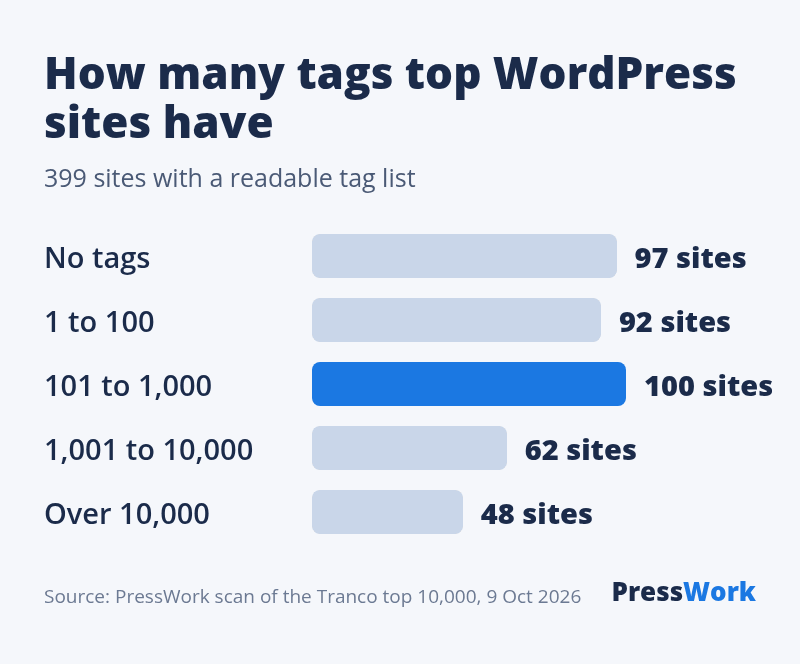
Among the 302 sites that use tags, half have more than 378. On 47 of the 271 sites where we could also count posts, there are more tags than posts.
Most tags are used once
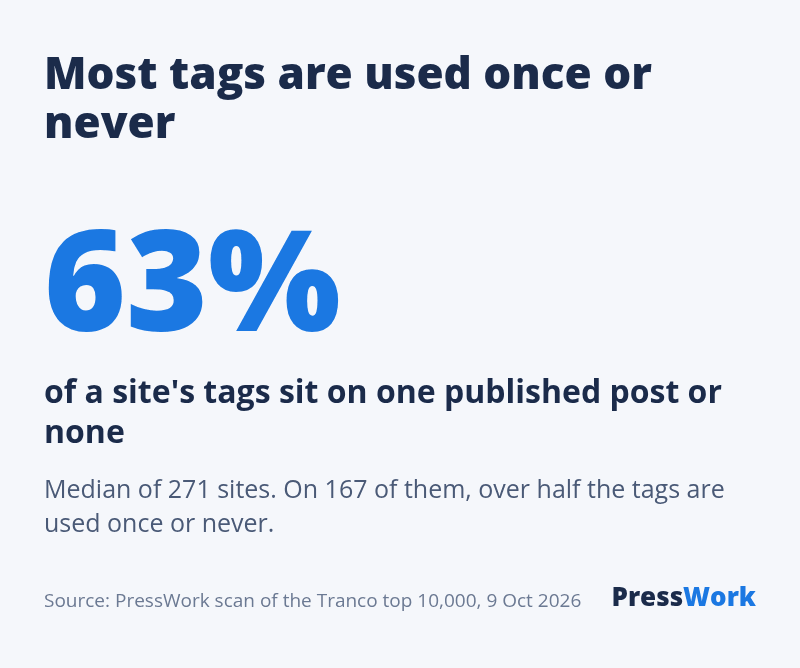
On the median site, 63% of tags sit on one published post or none. That is the middle value of 271 sites; on 167 of them, more than half the tags are used once or never.
Three examples, each re-checked by hand on 9 October 2026:
- hackaday.com: 56,958 tags for 58,571 posts. 32,810 of the tags (58%) are used once or never.
- woocommerce.com: 1,513 tags for 559 posts. 1,449 of them (96%) are used once or never.
- globalnews.ca: 1,466,763 tags for 1,014,146 posts. 1,012,943 of them (69%) are used once or never.
This is what happens when writers type new tags for each post instead of picking existing ones. Each of those tags is a page. Google’s guide says duplicate content “is not a violation of our spam policies”, but that “search engines might waste crawling resources on URLs that you don’t even care about”.
How we counted. WordPress stores, for each tag, the number of published posts that use it. We asked each site for its tags sorted by that number. A second pass removed 22 sites whose answers came back unsorted, which leaves 271. Sites that block the REST API are not in the data, and we don’t name the adult sites in the list.
Do big sites let Google index their tag pages?
Two out of three do. We opened one tag page per site, usually the most-used tag, and looked for a noindex instruction. Of 245 pages that loaded, 166 (68%) can be indexed and 79 (32%) say noindex.
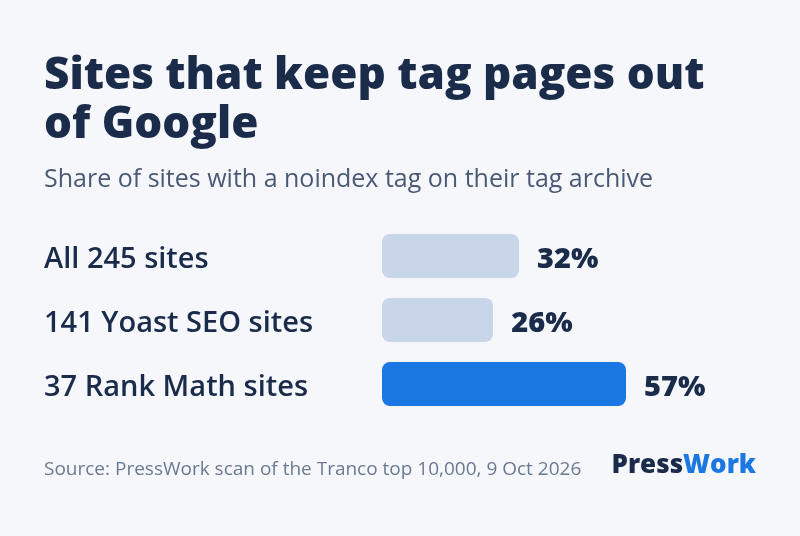
The split follows the SEO plugin. Among sites running Yoast SEO, 37 of 141 (26%) set their tag page to noindex. Among sites running Rank Math, 21 of 37 (57%) do. nasa.gov, for example, runs Rank Math, has 41 tags and keeps its tag pages out of Google.
The next section shows why: the two plugins ship with opposite defaults, and many sites keep them.
What each SEO plugin does with tags by default
Two of the six plugins we checked set tag pages to noindex on a new install: Rank Math and SEOPress. The other four leave them indexable. We read the default settings in each plugin’s code, in the versions on WordPress.org on 9 October 2026.
| Plugin | Tag pages | In its sitemap |
|---|---|---|
| WordPress alone | Indexable | Yes |
| Yoast SEO 28.6 | Indexable | Yes |
| All in One SEO 5.0.3 | Indexable | Yes |
| Slim SEO 4.11.0 | Indexable | Yes |
| The SEO Framework 5.1.4 | Indexable | No |
| Rank Math 1.0.280 | Noindex | No |
| SEOPress 10.3 | Noindex | No |
- Empty tags. Rank Math, Slim SEO and The SEO Framework set a tag page with no posts to noindex by default. The sitemaps of WordPress, Yoast SEO and Slim SEO leave empty tags out.
- The two most-used plugins disagree. A new Yoast SEO install leaves tag pages indexable; a new Rank Math install sets them to noindex. Check the setting after any switch.
- Every plugin lets you change it. The default is a starting point, not a rule.
More on the six plugins: the best SEO plugins for WordPress and Rank Math vs Yoast.
Tags vs categories
Categories are the table of contents; tags are the index at the back of the book. In WordPress’s own words: “Unlike Categories, Tags have no hierarchy so there is no Parent->Child relationship”.
| Categories | Tags | |
|---|---|---|
| Structure | Parents and children | Flat list |
| Required | Yes | No |
| Address | /category/ | /tag/ |
| Good for | Main sections | Specific subjects |
For search engines they work the same way: each one makes an archive page. The difference is that nothing stops tags from piling up, as the numbers above show.
Should you index your tag pages?
Index a tag page when it is a page someone would want to land on; noindex it when it is not. This part is our advice, not a measurement.
- Index if most of your tags gather several posts, the tag names match what people search for, and no category or article already covers the same subject.
- Noindex if most tags have one or two posts, or if tags repeat your categories (“SEO” as a category and “seo” as a tag).
- Skip tags if you have no use for them. 97 of the 399 top sites we read have none.
Noindex doesn’t remove the pages for your visitors. The tag links still work on your site; the pages just stay out of search results. Fixing the tags themselves is better than hiding them.
How to clean up your tags
Sort your tags by use, delete the ones that gather nothing, and stop creating new ones for each post.
- Find the weak ones. Go to Posts, Tags and click the Count column to sort by number of posts.
- Check for traffic first. In Google Search Console, filter pages by
/tag/to see which tag pages get clicks. Keep those. - Delete or merge. Deleting a tag removes it from its posts, and its page then returns a 404 error. For a tag page that had visits, add a redirect to the closest tag or category.
- Turn tags into categories, or the reverse. WordPress offers a Categories and Tags Converter under Tools, Import.
- Set a rule. Pick tags from the existing list. Add a new one only when you expect to write several posts about it.
What to do next
- Count your tags and your posts (Posts, Tags). More tags than posts means most are used once.
- Sort the tags by Count and note how many have one post or none.
- Open one of your tag pages, view the source and search for “noindex” to see what your SEO plugin set.
- Decide: clean up and index, or noindex. Then set it in your SEO plugin’s settings for tags.
- Changed SEO plugin recently? Check the tag setting again: the defaults differ.
Which SEO plugin does that site run?
Paste any address into our free plugin detector to see the SEO plugin and the other plugins on the page.
FAQ
Do WordPress tags help SEO?
Not on their own. A tag creates an archive page that lists the posts sharing it, and that page helps only if it gathers enough posts to be worth visiting. On the 271 top WordPress sites we measured, the median site uses 63% of its tags on one published post or none.
Are WordPress tags the same as meta keywords?
No. WordPress doesn’t print a keywords meta tag from your tags, and Google’s SEO Starter Guide says “Google Search doesn’t use the keywords meta tag.” A tag only creates an archive page and links to it.
Should I noindex tag pages in WordPress?
Noindex them if most of your tags have one or two posts or repeat your categories. Keep them indexable if each tag gathers several posts on a subject people search for. Of 245 top sites we checked, 79 (32%) set their tag page to noindex.
Which SEO plugins noindex tags by default?
Rank Math 1.0.280 and SEOPress 10.3 set tag pages to noindex on a new install. Yoast SEO 28.6, All in One SEO 5.0.3, Slim SEO 4.11.0 and The SEO Framework 5.1.4 leave them indexable, as does WordPress without a plugin.
How many tags should a WordPress post have?
WordPress sets no limit. Our advice: pick from the tags you already have, and add a new one only when you expect several posts about it. A tag used once makes a page with a single post on it.
What is the difference between tags and categories in WordPress?
Categories can have parents and children and every post needs one; tags are a flat, optional list. Both create archive pages, at /category/name/ and /tag/name/ by default.