Short answer: Rank Math for most sites. It gives you redirects, a 404 monitor and 16+ schema types for free. Pick Yoast SEO if you want the most tutorials and hand-holding, and The SEO Framework or Slim SEO if speed matters more than features.
Key takeaways
- Rank Math gives the most for free: redirects, a 404 monitor and 16+ schema types.
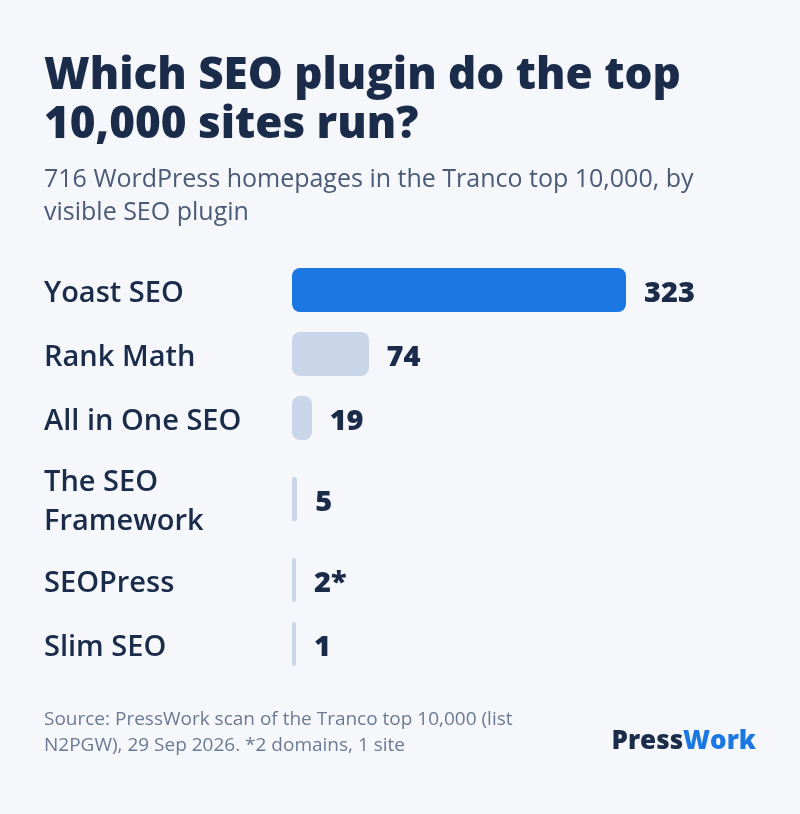
- Of the 716 WordPress sites in the top 10,000, 323 show Yoast and 74 Rank Math.
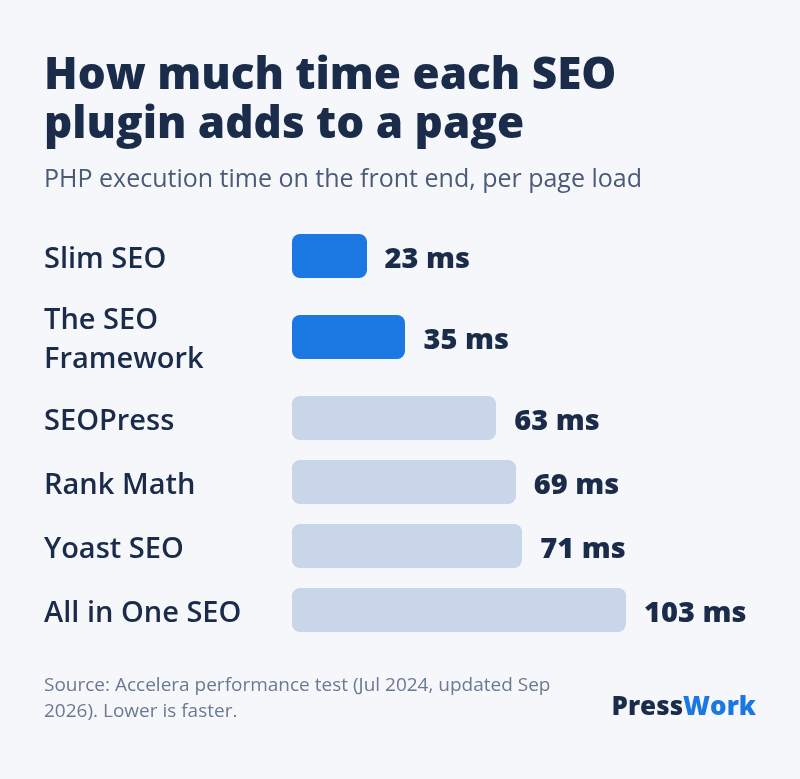
- Slim SEO and The SEO Framework add 23–35 ms per page; All in One SEO adds 103 ms (Accelera).
Most “best SEO plugin” lists are written by someone selling one of them. Rank Math’s own list ranks first on Google for this search (US results, 29 September 2026). So we did two things differently. We checked every price and feature on the plugins’ own pages, and we scanned the top 10,000 websites to see which SEO plugin the big WordPress sites actually run.
What the top 10,000 websites use
On 29 September 2026 we loaded the homepage of every domain in the top 10,000 of the Tranco list, a research ranking of the most visited sites. 6,108 homepages answered. 716 of them run WordPress. We then looked for the signature each SEO plugin prints in the page code.
| SEO plugin | WordPress sites | Share of sites with a detectable SEO plugin |
|---|---|---|
| Yoast SEO | 323 | 76% |
| Rank Math | 74 | 17% |
| All in One SEO | 19 | 4.5% |
| The SEO Framework | 5 | 1.2% |
| SEOPress | 2 | 0.5% |
| Slim SEO | 1 | 0.2% |
| SmartCrawl | 1 | 0.2% |
| No SEO plugin detected | 292 | n/a |
Three things stand out:
- Yoast dominates big sites. Three out of four top sites with a visible SEO plugin run it. Big sites rarely switch SEO plugins once one is in place, so this mostly reflects old decisions. It tells you Yoast is safe at scale, not that it’s the best choice for a new site.
- Rank Math is the clear number two, with 74 sites, four times as many as All in One SEO.
- 41% of big WordPress sites show no SEO plugin. Large publishers often use custom code or hide the plugin’s signature. Our count only sees plugins that identify themselves, so small plugins are likely undercounted.
The light plugins have serious users too. Ars Technica, Purdue University and the Vivaldi browser’s site all run The SEO Framework.
The 6 best SEO plugins for WordPress, compared
All six are free on WordPress.org and cover the basics: titles, meta descriptions, XML sitemaps, canonical tags and schema. The table shows where they differ.
| Plugin | Active installs | Rating | Frontend time | Paid version from | Best for |
|---|---|---|---|---|---|
| Rank Math | 4+ million | 4.8 (7,507) | 69 ms | €8.99/month, billed yearly | Most features free |
| Yoast SEO | 10+ million | 4.8 (27,820) | 71 ms | €118.80/year | Beginners |
| All in One SEO | 2+ million | 4.7 (5,215) | 103 ms | $99/year | Guided setup, local SEO |
| SEOPress | 300,000+ | 4.8 (1,259) | 63 ms | $49/year | Cheapest full-featured Pro |
| The SEO Framework | 200,000+ | 4.9 (379) | 35 ms | $7/month, billed yearly | Speed with sensible defaults |
| Slim SEO | 70,000+ | 4.7 (136) | 23 ms | $59/year | No settings at all |
A 23 ms or 103 ms difference won’t decide your rankings alone. It adds up with every other plugin on a cheap host, though, and that’s where the light plugins earn their place.
1. Rank Math: best overall
Rank Math puts features in the free version that others charge for:
- a redirect manager and a 404 monitor
- 16+ schema types (article, product, recipe, local business, FAQ and more)
- up to 5 focus keywords per post
- modules you can switch off one by one, so you only load what you use
Downsides: the setup wizard pushes you to connect a Rank Math account, and the dashboard advertises the Pro plan. Switch off the modules you don’t need right after installing. This site runs Rank Math with only four modules on.
Price: free. Pro starts at €8.99 a month, billed yearly, with a first-year discount.
2. Yoast SEO: best for beginners
Yoast SEO is the most installed SEO plugin on WordPress.org, with over 10 million sites. Its traffic-light checks tell you, post by post, what to fix in your title, headings and readability. Because so many people use it, almost every WordPress tutorial and every host’s help page assumes Yoast.
Downsides: the redirect manager and multiple keyphrases are Premium only. The traffic lights also push people to chase a green dot instead of writing for the reader.
Price: free. Premium costs €118.80 a year.
3. All in One SEO: best guided setup
All in One SEO (AIOSEO) has the most complete setup wizard, plus paid add-ons for local SEO, WooCommerce and link building. Its TruSEO score works like Yoast’s traffic lights, and it generates an llms.txt file for AI search tools.
Downsides: it was the slowest plugin in Accelera’s test, and the free version shows the most upgrade prompts. It is the only one of the big three that lets you remove all its data on uninstall with a simple toggle, which is a point in its favor.
Price: free. Pro plans start at $99 a year, with a lower first-year rate. Deciding between it and Yoast? See Yoast vs All in One SEO.
4. SEOPress: best value if you’ll pay
SEOPress has a clean, modular interface. Its Pro version adds unlimited redirects, 404 monitoring, a broken link checker and white labeling, which agencies like.
Downsides: a smaller user base, so fewer tutorials. Most of its advanced tools need Pro.
Price: free. Pro costs $49 a year for 1 site, or $149 a year for unlimited sites. Read our full SEOPress review.
5. The SEO Framework: fastest with real features
The SEO Framework writes titles and descriptions automatically, outputs schema and sitemaps, and keeps thin pages out of the index without being asked. It has no ads and no scoring widgets. It ran about twice as fast as Yoast and Rank Math in Accelera’s test.
Downsides: no redirect manager. Pair it with the free Redirection plugin. Keyword guidance is a paid extension.
Price: free. Paid plans start at $7 a month, billed yearly.
6. Slim SEO: best if you never want to touch a setting
Slim SEO configures itself. It fills in titles, descriptions, schema, sitemaps and breadcrumbs from your content, and the free version includes redirects and 404 monitoring. It was the fastest plugin in Accelera’s test.
Downsides: little control if you do want to fine-tune, and the smallest community of the six.
Price: free. Pro starts at $59 a year.
Which one should you pick?
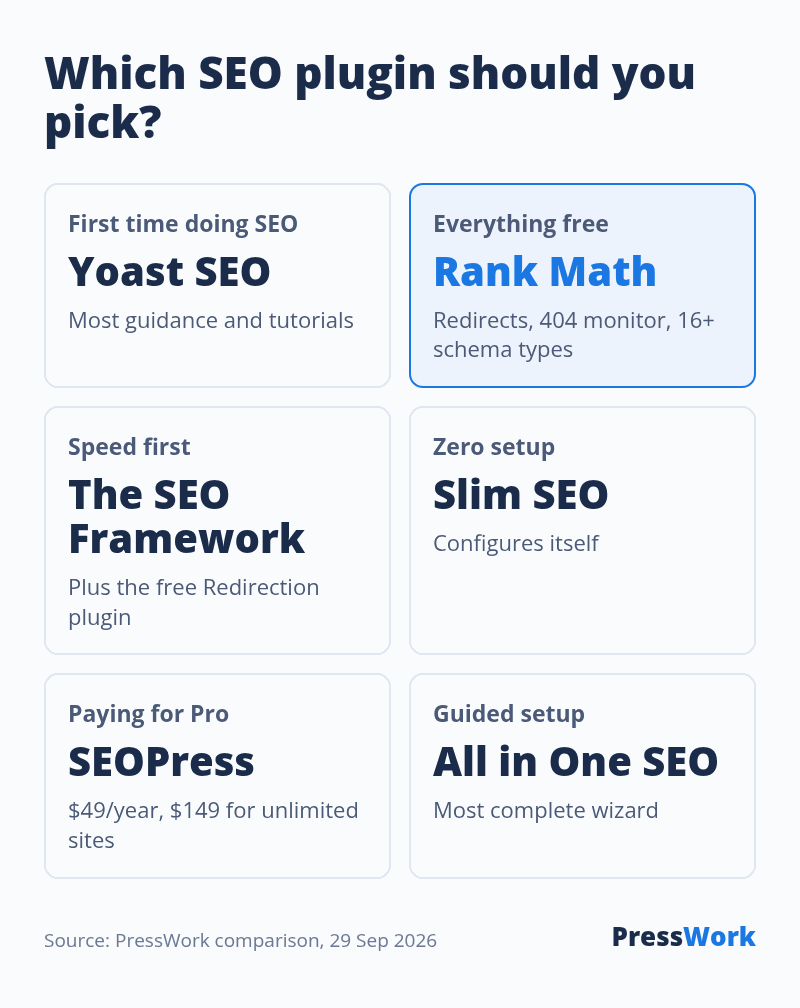
- New site, first time doing SEO: Yoast SEO. The guidance and the tutorials are worth the extra weight.
- You want everything free: Rank Math. Torn between it and Yoast? See our Rank Math vs Yoast comparison.
- Speed first, you know the basics: The SEO Framework, plus Redirection.
- You want zero setup: Slim SEO.
- You’ll pay for Pro, or run client sites: SEOPress.
Whatever you pick, install one. Two SEO plugins print two sets of titles, canonicals and schema, and search engines get mixed signals. Switching later is safe: Rank Math, Yoast, AIOSEO and SEOPress can each import the others’ titles and descriptions.
Curious what a competitor runs? Paste their address into our WordPress plugin detector. For the rest of the setup, see Is WordPress good for SEO?, which includes a 10-step checklist.
What to do next
- Pick one plugin from the list above for your situation.
- If you already run one, keep it unless you need a feature it lacks.
- Switching? Back up, run the new plugin’s importer, check 5 pages, then deactivate the old one.
- Resubmit your sitemap in Google Search Console after the switch.
See what a competitor runs
Paste any address into our free plugin detector to see its SEO plugin, theme and every plugin that loads on the page.
FAQ
What is the best free SEO plugin for WordPress?
Rank Math. Its free version includes a redirect manager, a 404 monitor, 16+ schema types and up to 5 focus keywords per post, which Yoast and All in One SEO keep for paid plans. If you’d rather have speed than features, The SEO Framework and Slim SEO are both free and much lighter.
Is Yoast SEO free?
Yes. The free version covers titles, meta descriptions, sitemaps, schema and the readability checks. Yoast SEO Premium, at €118.80 a year, adds the redirect manager and multiple keyphrases.
Is Rank Math free?
Yes. The free version on WordPress.org is fully usable and has more features than most free SEO plugins. Rank Math Pro starts at €8.99 a month, billed yearly, and adds keyword rank tracking, more schema options and WooCommerce features.
Do I need an SEO plugin for WordPress?
For most sites, yes. WordPress alone gives you clean URLs, title tags and a basic sitemap, but no meta descriptions, no control over which archives get indexed and very little schema. A free plugin fills those gaps in a few minutes.
Can I use two SEO plugins at the same time?
No. Two SEO plugins print duplicate titles, canonical tags and schema. Pick one, import your old settings into it, then deactivate the other.
How we made this list
Install counts, ratings and features come from each plugin’s WordPress.org page. Prices come from each plugin’s own pricing page. Both were checked on 29 September 2026. Speed figures are Accelera’s, not ours. The usage data comes from our own scan, described above. PressWork has no affiliate deal with any of these plugins.